Introduction
Maintaining my first freshwater aquarium taught me that what looks simple on the surface depends on complex, interconnected systems. Balancing water chemistry, managing algae, and preventing fish loss required observation, iteration, and patience.
TLDR (Summary)
TankMate is a concept mobile app designed to help freshwater aquarium owners set up, monitor, and maintain their tanks without the overwhelm. As a solo project, I led end-to-end UX — from surveys and user interviews through to high-fidelity prototyping in Figma — identifying two distinct user types with competing needs: beginners who need guidance, and experienced hobbyists who don't want to be slowed down.
The solution centered on progressive disclosure — keeping the interface clean while making deeper guidance available on demand through tooltips, inline reference ranges, and a dedicated resources section. Two rounds of usability testing validated the approach, with task completion rates and satisfaction scores improving measurably after each iteration. The biggest takeaway: in an app built for a technically complex hobby, clarity isn't just good UX — it's the whole product.
The Process
Discovery
Using surveys, interviews, and secondary sources (forums, Reddit), I identified three core user segments: new owners, casual hobbyists, and intermediate aquarists. Advanced aquarists were deprioritized — they've already built personal systems.
"It feels insane that in 2026, there's no simple, modern, cross-platform web app where I can log parameters in 10 seconds on my phone... Am I the only one frustrated by this?"
— Reef2Reef forum user
Problem
New aquarium owners face scattered resources and a steep learning curve. Managing water chemistry, algae, and fish health through trial and error is discouraging and often leads to preventable mistakes.
Insight
Aquarium keeping is a system of ongoing checks and balances. What hobbyists need most is clear guidance and timely feedback — not more forums to dig through.
Solution
An app that walks users through tank setup, tracks water parameters, and sends maintenance reminders — turning an overwhelming hobby into an intuitive, supported experience.
Goals
Help users monitor water parameters without technical overwhelm
Send timely reminders to reduce preventable mistakes
Key findings
Wants: track multiple tanks, get maintenance reminders, and access a reliable species guide
Top frustrations: buggy apps, restrictive paywalls, missing species/plants, and poor offline support
Core needs: reliable data, an easy UI, and control over their own tank information
Define
Two personas captured the range of user needs:
Sarah: The Carnival Goldfish
Age
24
Experience
3 months
Tank(s)
10 Gallon
Goals
Keep fish healthy, learn proper care
Frustrations
Conflicting advice, forgetting tasks
Needs
Step-by-step guidance, maintenance reminders, simple water info
Marcus: The Discus Dad
Age
38
Experience
3+ Years
Tank(s)
75, 55, and 20 Gallon
Goals
Optimize tank conditions, track multiple species
Frustrations
Manual tracking, scattered data
Needs
Customizable tracking, trend analysis, advanced species info
Ideate
I created a number of task-based user flows to help with navigation and intuitiveness. This helped not only helped keep track of the features I needed, but also helped simplify the overall architecture of the app. In turn, this generally makes apps easier to use and navigate.
Design
I chose a friendly, approachable brand over a sleek, modern look to lower the barrier for beginners.
Typography: Poppins for headers (playful, geometric), Lato for body text (soft, readable)
Color: Teals and corals balanced with light neutrals — calm and inviting, not corporate
Poppins Header
This the body style font, called Lato.
Primary
Secondary
Accent
Alt
Design Reasoning (Top 5 Screens)
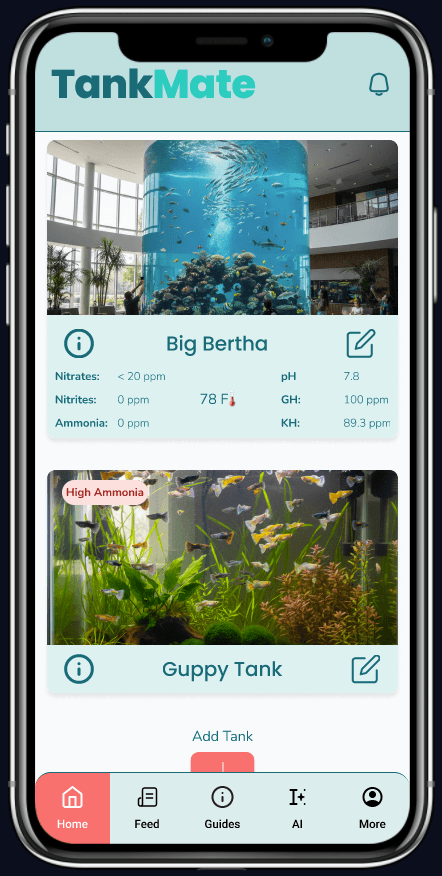
The home page has a scannable and expandable format that allows users to view recent updates without having to navigate though the app. It also acts as the gateway to other features that all pertain to tank maintenance and water parameters because this is the core purpose of the app.
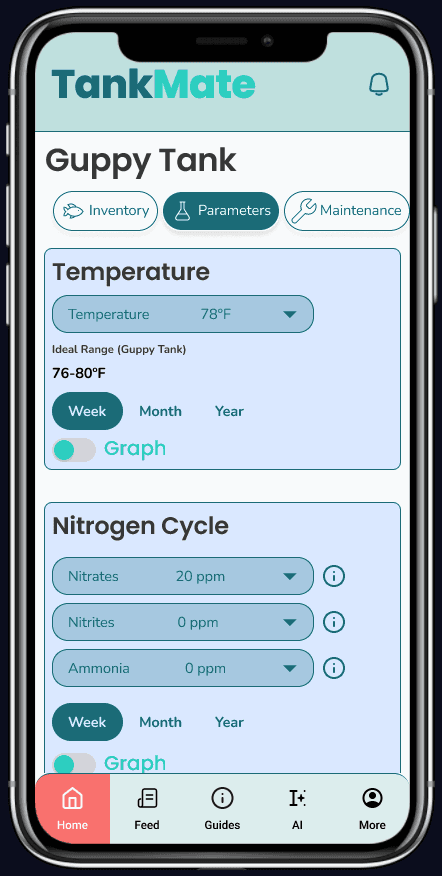
Parameters
The parameters include tracking, viewable across long and short periods of time to encourage daily, long-term engagement. This benefits the user by giving them resources to analyze their tank and resolve, or prevent, any issues that may arise. Additionally, a graph feature is added for appropriate data visualization.
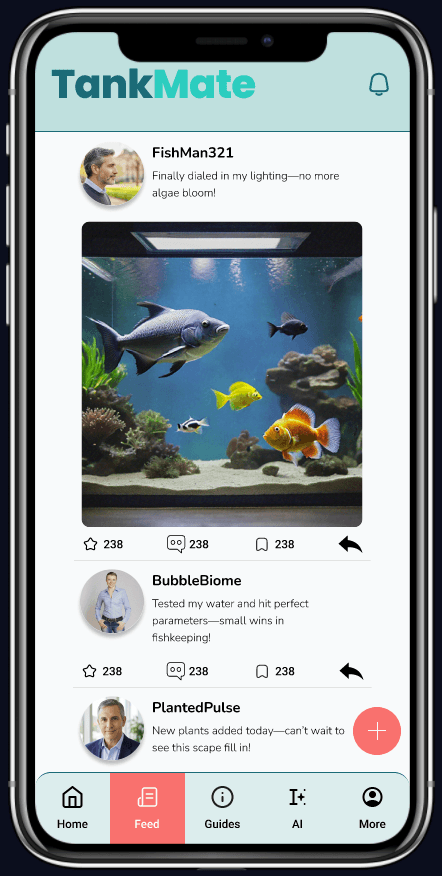
Social Media Feed
Forums and communities for aquarists are common, often seeking trades or information. I included the social media aspect as a way for aquarists to communicate within the app. This also has the added benefit of users coming back to the app for more than their daily parameter check (e.g., to check photo comments).
Gallery
The gallery feature is meant to allow users to track the state of their aquarium visually. This includes plant growth and algae outbreaks, and they can cross reference their maintenance schedule with this to determine when and why issues may occur.
Notifications
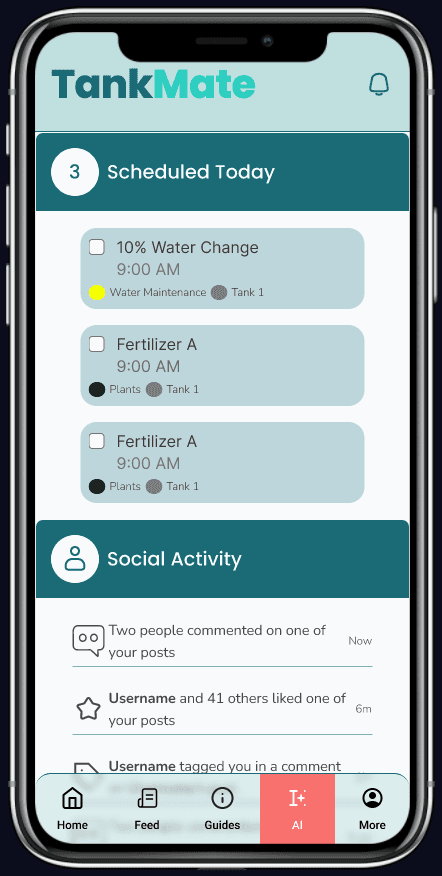
The notifications are split into two sections purposefully. This allows users to separate urgent notifications (i.e., maintenance reminder) from less important notifications (a like on photo). Additonally, as notifications are important, they are fixed and accessible from nearly every screen.
Testing & Iteration
Five participants for each iteration (a total of 10 participants) completed a usability study through Maze.
Each completed three tasks
Adding a tank
Logging water parameters
Setting a maintenance reminder
Iteration 2 improved on all measures
Average satisfaction
Average successful completion rate
Average time on tasks
Sample
5
(n=10)
Tasks
3
per participant
Average Satisfaction
1
68%
2
76%
Avg. Completion
1
64%
2
74%
Avg. Time on Task
i1t1
90s
i1t2
45s
i1t3
50s
i2t1
78s
i2t2
40s
i2t3
37s
Key Findings & Next Steps
Usability testing revealed four primary areas for iteration.
Tooltips added during onboarding
Jargon caused hesitation and drop-off. Tooltips helped clarify and guide users when onboarding.I chose modal tooltips over inline text because I didn't want to penalize experienced users with information they already know — but I needed beginners to feel supported without having to ask for help."
Navigation was refined
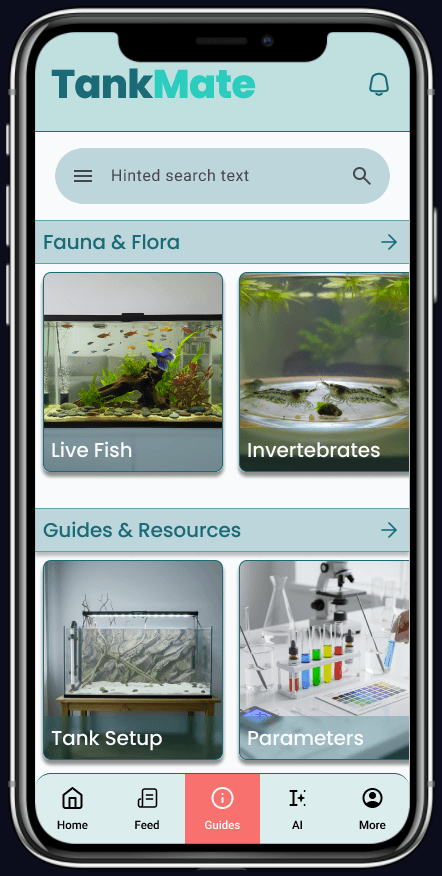
The search page was replaced with a dedicated guides and resources section, giving users a clearer path to reference material. Both a guide and a chatbot were included to appeal to how different users find and learn information (i.e, traditional search vs. conversational approach)
Icons were paired with text labels
References added for parameters
Users were uncertain what to input without visible reference ranges, so inline "healthy range" indicators and contextual hints were included. This prevents confusion, and therefore errors, that could be costly to users, such as a misunderstanding of the appropriate measurements of nitrates.
These findings reinforce a core principle of the project: clarity matters more than sophistication. The next round of testing validated that these changes meaningfully reduce task errors and improve completion rates.
Reflection
Testing TankMate across two iterations reinforced how much small design decisions shape the way users feel about a product — not just how they use it. The first round surfaced friction where it was expected: onboarding jargon, missing reference ranges, and icon legibility. The second iteration, which introduced tooltips, inline guidance, and paired text labels, showed measurable improvement across every task — one participant summed it up best: "I've been guessing at my water changes for months. I wish I had something like this when I started." That response captured exactly what TankMate set out to do — not just help users manage a tank, but make them feel supported doing it. It also reinforced a lesson that carried through every phase of this project: clarity is a design decision, and every label, tooltip, and reference range is an opportunity to either lose a user or earn their trust.